workflow:
dedupe-leadson-csv-uploaded
→
normalize
→
dedupe
→
upsert.contacts
→
notify.slack
3 workflows · 2 sub-workflows · opens in builder
Describe what you need and get a workflow that runs. Package it with its triggers, data stores, and dashboards, and install it across your customer base.
It is one piece. A solution also needs the data it reads, the dashboards over it, the triggers that fire it, and the connections wired per customer. On most platforms each of those is a separate thing you rebuild by hand for the next customer. We make every piece shippable, so the whole solution travels in one package.
dedupe-leadssettings · 5 rows agent-performancetools.ai-scheduling-agentThe same surfaces, step by step: design the workflow, wire the triggers, model the data, read it back on a dashboard, then package it and install it for the next customer.
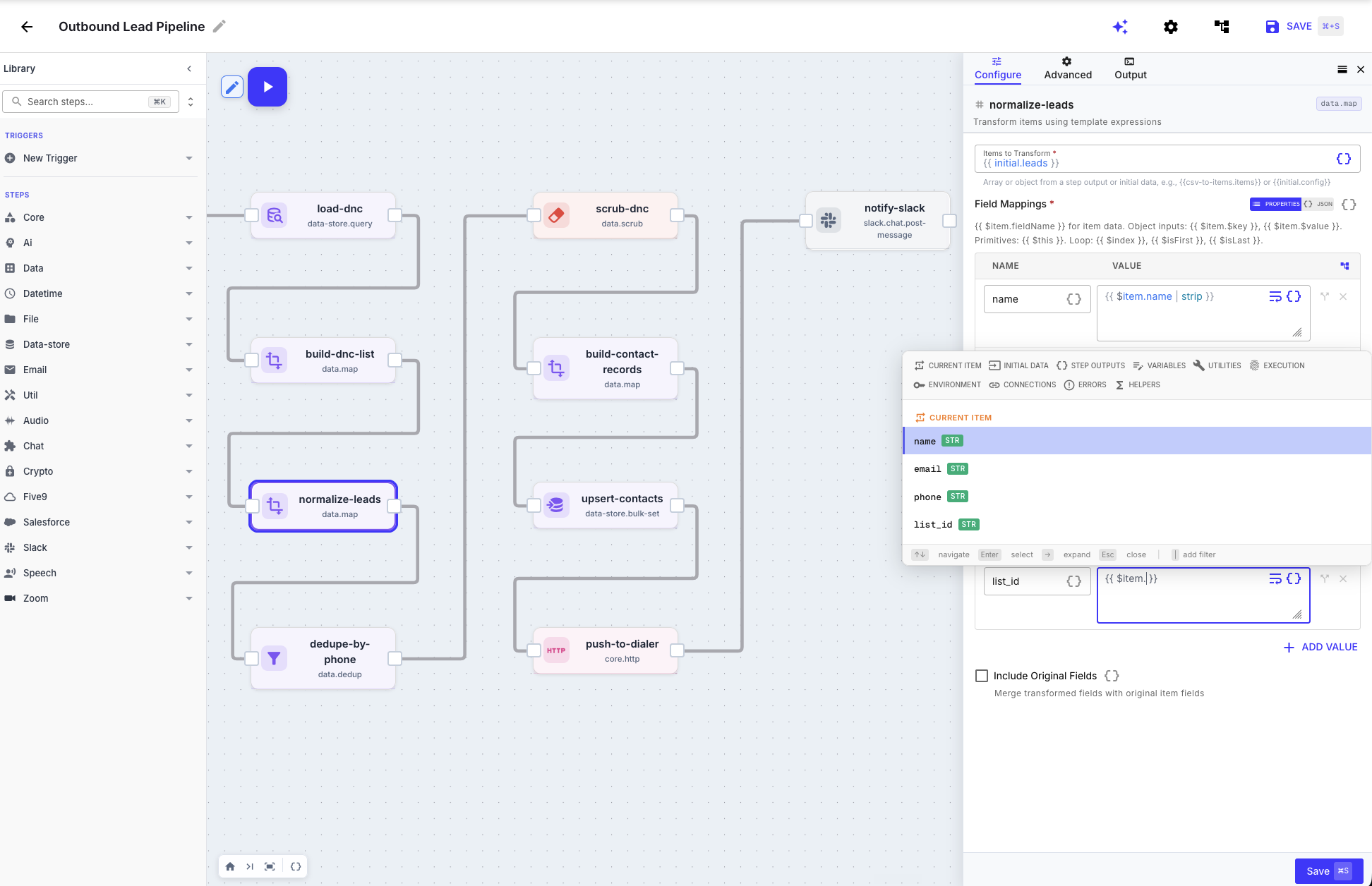
Drag steps onto the canvas to build you business logic, or build with the AI builder.
Today every client is a fresh project: a new build, somewhere to host it, one more thing to maintain. Package it once and that ends. Install the same solution for every client you serve, each on their own data and settings, and let us run the hosting, the scaling, and the uptime. You ship in days, not quarters, and the work you did for the last client compounds into the next.
200+ step types plus first-class connections to the tools your operation depends on. If it has an API, you connect to it.
Don't see your system? . We can probably connect to it.
This morning's report, in Slack. The contact list, scrubbed overnight. The new agent, provisioned before their first coffee.
Leads from CRM to dialer in seconds. Enrich, modify, or apply your DNC list to leads on the way through. No more weekly CSVs.
Install Record SyncSync every customer call to your CRM as a complete activity record, including abandons and calls that end without reaching an agent.
Install Activity SyncRaw lists deduped and cleaned before they hit the dialer. Merge duplicates by phone and address, drop the junk, keep what's real. Stop dialing the same person twice.
Clean the list firstA chat interface for your business systems. Read, write, and run procedures across the tools your team already uses.
See how it worksInspect every workflow, connection, and setup requirement before anything changes in your organization.
Each client gets a separate installation with its own credentials, configuration, data stores, and settings. Package definitions can be reused; client data and secrets do not travel between installations.
Publish a new package version once. Each client installation stays on its current version until you are ready to pull and verify the upgrade for that client.
You can export workflow definitions with the QuickFlo CLI and download packages. QuickFlo runs the hosted runtime; a self-hosted QuickFlo runtime is not offered today.
Not if you own the build. Give clients the forms, dashboards, or chat surfaces they need and use the setup checklist for connections. They only need the builder if you choose to hand it over.
A template is a workflow outline. A QuickFlo package can include workflows, triggers, data stores, dashboards, required connections, install-time configuration, and the setup checklist together.
Walk us through the solution you have in mind. We will tell you what we can package and how fast. Most go live in days, hosted and scaled by us.
Prefer to dig in yourself? Start building with a free account.